Microsoft Dynamics 365 Business Central Implementation & NAV to Business Central Upgrade Services
Many organizations still rely on legacy ERP platforms such as Microsoft Dynamics NAV. While these systems once served as dependable operational backbones, the pace of modern business has changed considerably. Companies now demand faster insights, real-time visibility, and flexible access to information from multiple locations. Traditional ERP environments often struggle to deliver this level of agility.
When systems become slow to update, difficult to maintain, or disconnected from modern cloud tools, daily operations begin to feel constrained. Data becomes scattered across departments, reporting takes longer than expected, and routine updates require significant technical effort.
This is where Microsoft Dynamics 365 Business Central comes into the picture. Businesses looking for a structured shift toward modern ERP often begin with Business Central implementation or a NAV to Business Central upgrade. Through careful planning, data migration, and system configuration, companies can transition from older ERP environments into a unified platform that connects finance, sales, operations, and inventory in one ecosystem.
Our implementation and upgrade services help organizations across Delhi and throughout India modernize their ERP environment without operational disruption. From initial consultation to deployment and post-launch support, the process is designed to keep business operations steady while the technology foundation evolves.
Understanding Microsoft Dynamics 365 Business Central
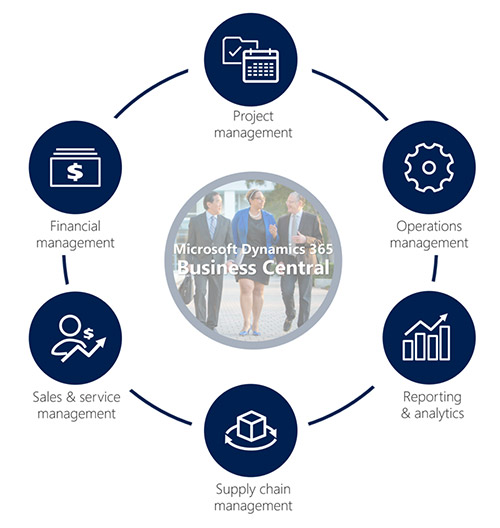
Microsoft Dynamics 365 Business Central is a cloud-enabled enterprise resource planning system designed for small and mid-sized businesses. Rather than operating separate systems for finance, supply chain, customer management, and project tracking, Business Central integrates these functions within a single application environment.
This integration creates a shared data structure where information flows smoothly between departments. Financial records update instantly as sales transactions occur. Inventory levels adjust automatically when orders are processed. Management teams can view current operational metrics without waiting for manual reports.
Unlike older ERP models that rely heavily on on-premise infrastructure, Business Central operates efficiently in cloud environments such as Microsoft Azure. This means employees can securely access information through browsers or mobile devices from virtually any location.
Another advantage lies in its close relationship with the Microsoft ecosystem. Tools like Microsoft 365, Power BI, and Power Platform connect naturally with Business Central, enabling businesses to expand their capabilities without complicated integrations.
Why Businesses Move from Dynamics NAV to Business Central
Microsoft Dynamics NAV has supported many companies for years, and in many cases, it still performs fundamental ERP tasks effectively. However, Microsoft’s development focus has gradually shifted toward Business Central. This shift means new capabilities, improvements, and security enhancements now arrive primarily within the Business Central platform.
Organizations running older NAV versions often begin noticing practical limitations. Software updates become less frequent. Integrating modern cloud tools requires extra customization. Maintaining local servers increases IT overhead.
Upgrading from NAV to Business Central resolves many of these challenges. Businesses gain access to regular Microsoft updates, improved system performance, and advanced reporting capabilities. Security also improves significantly because cloud-based environments include automated monitoring, encryption, and structured data protection.
Another advantage involves operational transparency. With Business Central, leadership teams gain faster insights into financial health, sales performance, and inventory movement. Instead of assembling information from multiple systems, decision-makers can rely on real-time dashboards.
For organizations planning long-term growth, a NAV to Business Central upgrade often becomes a logical next step.
Choosing Between Cloud and On-Premise Deployment
A critical decision during ERP modernization involves selecting the right deployment model. Business Central supports both cloud-based environments and on-premise installations, though cloud adoption has become increasingly common.
Cloud deployment through Microsoft Azure eliminates the need for maintaining internal servers. Businesses benefit from automatic updates, scheduled backups, and high system availability. Employees can log in securely from office networks, remote locations, or mobile devices.
On-premise deployment still remains relevant for organizations with strict data control requirements or existing infrastructure investments. In this setup, the system operates within the company’s own servers while still delivering the features of Business Central.
Choosing the correct deployment approach depends on several factors, including IT infrastructure, security requirements, operational flexibility, and long-term cost considerations. During implementation planning, these aspects are evaluated carefully before deciding on the deployment strategy.
Core Business Central Services We Provide
Transitioning to a modern ERP system involves several technical stages. Our services cover each phase of the journey, ensuring the system operates effectively from day one.
Business Central Implementation
Organizations adopting Business Central for the first time require a structured setup process. Implementation begins with a close examination of existing workflows, operational challenges, and reporting needs.
After understanding the business structure, the ERP environment is configured accordingly. Financial modules, inventory structures, sales processes, and reporting formats are aligned with the company’s operational practices.
Data migration forms an important part of this stage. Historical financial records, customer databases, product details, and vendor information are transferred carefully into the new environment. Each data segment undergoes validation to ensure accuracy.
User training sessions also take place before the system becomes fully operational. These sessions allow employees to familiarize themselves with navigation, reporting tools, and daily workflows.
NAV to Business Central Upgrade
Upgrading from Microsoft Dynamics NAV requires careful technical evaluation. Different NAV versions follow different upgrade paths, so planning begins with system assessment.
During the upgrade process, NAV data structures are analyzed and mapped into the Business Central environment. Custom extensions and workflows are reviewed to determine whether they should be migrated, modified, or replaced with native Business Central features.
Downtime is minimized through staged migration and testing phases. Once the upgraded system passes functional validation, it is introduced into the production environment.
This approach ensures that organizations move forward with a more efficient ERP platform without losing valuable historical data.
Cloud Migration to Microsoft Azure
Cloud migration services involve transferring ERP systems from local servers to the Azure environment. This transition improves reliability, accessibility, and security.
The migration process includes infrastructure preparation, database transfer, performance testing, and security configuration. Backup systems and disaster recovery plans are also implemented to ensure operational continuity.
After migration, businesses typically notice faster system response times and lower infrastructure maintenance responsibilities.
Customization and System Integration
Every business operates with unique processes. Business Central supports customization through extensions, workflows, and reporting modifications.
Companies often request specialized dashboards, automated approval sequences, or custom reporting formats that match their internal practices. These adjustments ensure that the ERP system reflects real operational patterns rather than forcing employees to adapt to rigid software structures.
Integration capabilities also allow Business Central to connect with external applications. Businesses commonly integrate tools such as Power BI for analytics, CRM platforms, and e-commerce systems like Shopify. APIs and connectors help maintain smooth communication between systems.
Post-Implementation Support and Managed Services
Launching a new ERP system is only the beginning of the operational journey. Continuous monitoring and technical support ensure long-term stability.
Managed services include system health checks, software updates, performance monitoring, and troubleshooting assistance. Service level agreements provide organizations with structured support timelines and predictable maintenance planning.
This ongoing assistance helps businesses focus on operations while the technical environment remains properly maintained.
Core Functional Capabilities of Business Central
Financial Management
Business Central simplifies financial administration through centralized accounting tools. General ledger management, accounts payable, accounts receivable, and budgeting functions operate within the same environment.
Multi-currency support and automated reconciliation processes help organizations manage financial transactions with greater precision. Cash flow forecasting tools also provide visibility into expected income and expenditures.
Supply Chain and Inventory Management
Inventory accuracy often determines operational efficiency for distributors and manufacturers. Business Central tracks stock levels in real time and helps manage procurement cycles.
Warehouse operations, vendor coordination, and product availability become easier to monitor through integrated dashboards. Demand planning tools also assist organizations in anticipating stock requirements based on historical trends.
Manufacturing and Project Management
Manufacturing businesses rely on detailed planning for production schedules and material usage. Business Central supports bill-of-materials management, capacity planning, and cost tracking.
Project-oriented organizations benefit from task scheduling, resource allocation, and expense monitoring. Managers can evaluate project profitability while maintaining control over timelines and budgets.
Reporting and Business Intelligence
Through integration with Power BI, Business Central provides analytical dashboards that convert operational data into meaningful visual reports. Executives can track financial performance, sales growth, operational efficiency, and key performance indicators in real time.
These insights allow leadership teams to identify trends quickly and make informed decisions.
Implementation Methodology
Every Business Central project follows a structured implementation framework to reduce operational risk.
Assessment and Discovery
The existing ERP system, data architecture, and operational processes are evaluated.
Solution Design
A technical blueprint is developed, outlining system configuration, workflows, and integration requirements.
Deployment and Testing
Modules are configured and tested to confirm functional accuracy and data consistency.
Go-Live and Stabilization
The system becomes operational while technical teams monitor performance and provide immediate support.
Business Outcomes Observed by Clients
Organizations implementing Business Central often experience measurable operational improvements. In several cases, manufacturing companies have reduced inventory carrying costs after gaining better stock visibility.
Distribution businesses have accelerated order processing by automating sales workflows and warehouse coordination. Service-oriented companies frequently report improved billing accuracy and faster invoice generation.
Beyond these specific improvements, many organizations notice broader benefits such as reduced IT maintenance, improved reporting reliability, and smoother collaboration between departments.
Technology Platforms and Expertise
Our implementation services focus on the broader Microsoft ecosystem supporting Business Central. This includes experience with:
- Microsoft Dynamics NAV environments
- Microsoft Dynamics 365 Business Central
- Microsoft Azure cloud infrastructure
- Power Platform tools, including Power BI, Power Apps, and Power Automate
- Integration with third-party business applications
This technical combination allows businesses to build ERP systems that extend beyond basic accounting functions.
Beginning the Journey Toward a Modern ERP Platform
Organizations eventually reach a point where legacy systems limit efficiency and transparency. Whether the challenge involves outdated NAV installations, disconnected applications, or slow reporting cycles, the shift toward a modern ERP environment becomes increasingly necessary.
Microsoft Dynamics 365 Business Central provides a structured path forward. With integrated modules, cloud flexibility, and strong connections to the Microsoft technology ecosystem, it allows businesses to manage finance, operations, and reporting through a unified platform.
Through thoughtful implementation, careful upgrade planning, and continued technical support, companies can adopt Business Central while keeping their operations stable. The result is an ERP system that keeps pace with the changing demands of modern business.
Ready to Get Started?
Contact us today to discuss your Business Central needs—whether implementation, upgrade, or support. Let’s map out a plan that works for your business.